HomeInfra
Welcome to my home infrastructure!
This is a high-level overview of the platform I run at home — the network edge, the compute and storage layers, and the services on top of them. It is deliberately kept free of internal addressing and hostnames; the detailed operational documentation lives on an internal docs site.
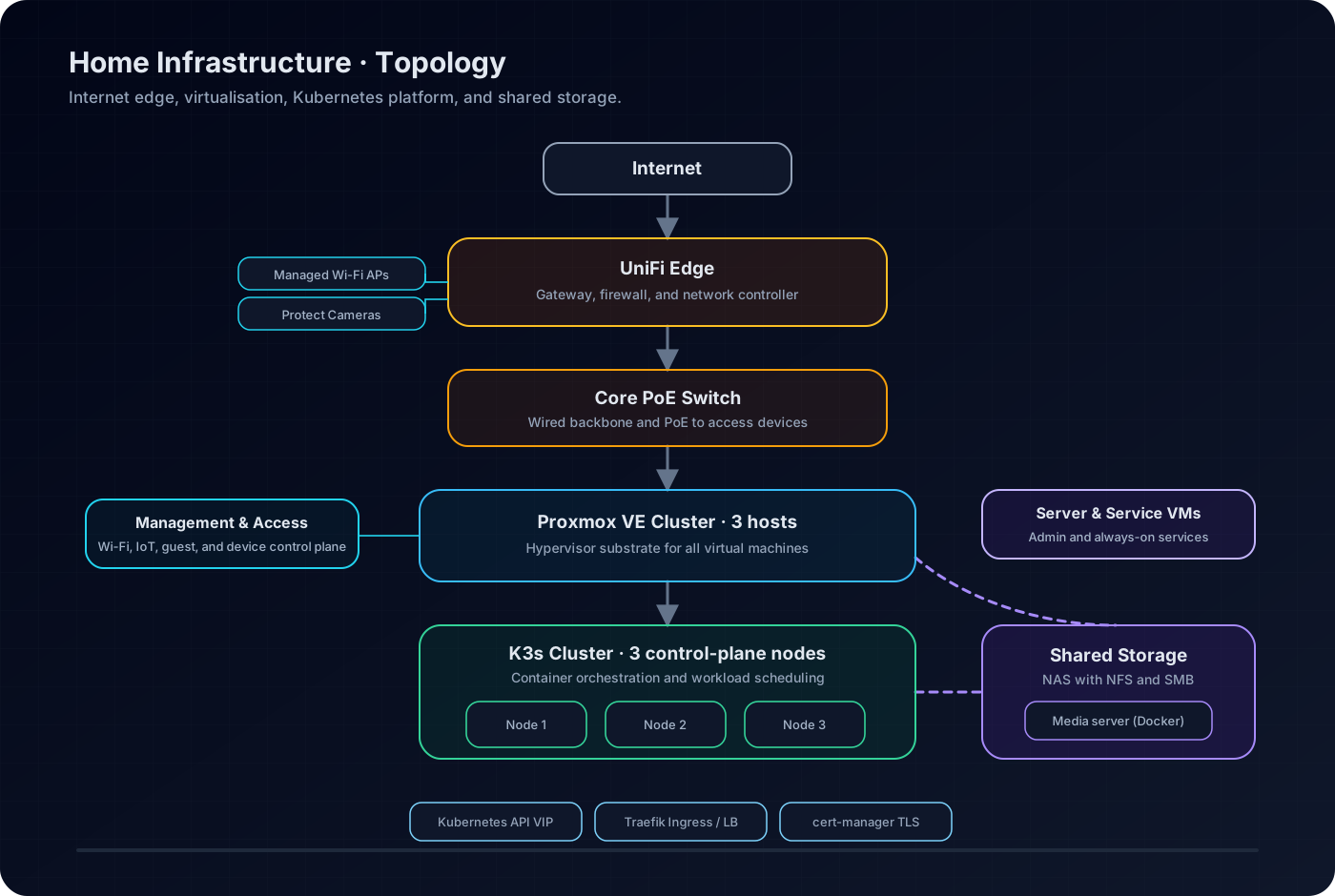
High-level topology: UniFi edge, Proxmox VE, K3s, and shared storage.
At a Glance
| Area | Platform |
|---|---|
| Network edge | UniFi Dream Machine Pro |
| Switching | UniFi 16-port PoE switch |
| Wireless | UniFi managed access points |
| Virtualization | 3-node Proxmox VE cluster |
| Kubernetes | 3-node K3s cluster |
| Shared storage | TrueNAS (NFS, SMB) |
| GitOps delivery | ArgoCD |
| Ingress & TLS | Traefik with cert-manager |
| Secrets management | HashiCorp Vault |
By the Numbers
Kubernetes cluster · days in service
Storage
Self-Hosting vs Cloud
What does running this stack at home actually cost me, compared to renting equivalent capacity in the cloud? I priced it out honestly: the hardware went in in February 2025, the electricity price here is 72 HUF/kWh, and the cloud numbers are on-demand list prices I pulled on 21 September 2026.
Monthly cost of running the same capacity: three ~16 GB Kubernetes nodes plus a ~32 GB storage host with ~7 TiB of data. On the home side: €3,741 of hardware (February 2025) amortised over the 7 years I plan to run it, an estimated ~175 W average draw at the local electricity price of 72 HUF/kWh, and the internet line. On the cloud side: on-demand list prices for like-for-like instance sizes and block storage, provisioned at 7.5 TiB for headroom. The UniFi network gear and the home connection would exist in any scenario, so they are left out of the cloud numbers — and leaving those common costs out of the home setup as well, it comes to about €32/month. Hetzner shows no egress bar because 20 TB/month of traffic is included per server.
I have been running this hardware for about 19 months now. Over the same period, the hyperscaler route would have billed roughly €24,800 (Azure) or €32,400 (AWS), and even the most budget-friendly cloud route (Hetzner) around €12,800 — versus what I actually spent: about €4,600, hardware once plus running costs.
Design Principles
- Segmented by purpose. Management, cluster, and server traffic each live on their own network segment, with Wi-Fi SSIDs mapped to the appropriate segment.
- Everything as code. Workloads and their configuration are described declaratively and delivered through GitOps flows.
- Separate storage tier. Bulk and shared storage is centralised on a dedicated NAS rather than spread across the compute hosts.
- Redundancy where it earns its keep. The hypervisor and Kubernetes layers both run as three-node clusters so a single host loss is not an outage.
Platform Layers
Network edge and access
- Gateway / controller: UniFi Dream Machine Pro handling routing, firewalling, and the UniFi control plane.
- Core switching: a UniFi 16-port PoE switch acting as the aggregation point and powering the access points.
- Wireless: UniFi-managed networks for primary, IoT, and guest access.
- Physical security: UniFi Protect cameras around the property.
Compute and orchestration
- Hypervisor layer: three Proxmox VE hosts with mixed local storage and RAM configurations.
- Cluster workload layer: a three-node K3s cluster, each node running as a VM on a separate Proxmox host for failure isolation.
- Service exposure: Traefik-based ingress with automated certificates, fronted by load-balancer VIPs for the API and ingress endpoints.
Storage
- Primary storage system: a dedicated TrueNAS server providing shared file services.
- Protocols in use: NFS for infrastructure and Kubernetes consumers, SMB for general data access.
- Media hosting: Plex runs directly on the storage platform as a Docker container.
- Kubernetes storage: Longhorn provides replicated block storage for stateful workloads, with a local-path class for ephemeral data and an NFS-backed class for shared volumes.
Platform Services
The Kubernetes cluster runs on a standard platform stack:
- Traefik (default ingress class)
- cert-manager for TLS lifecycle
- Longhorn for replicated persistent volumes
- MetalLB for load-balancer IPs
- ArgoCD for GitOps delivery
- Rancher for cluster management
- HashiCorp Vault for secrets
- CoreDNS, Metrics Server, and the local path / NFS storage provisioners
Hosted Workloads
Alongside the platform services, the cluster hosts:
- Documentation platform — an internally published MkDocs-based reference for this infrastructure.
- Cluster management UI — day-to-day Kubernetes administration.
- Secrets management — Vault-backed secret storage.
- Password manager — self-hosted vault for personal credentials.
- Media automation and streaming — request, download, and library management integrated with the NAS media store.
- Dynamic DNS automation — keeps public DNS records pointed at the current WAN address.
Operations
Keeping the platform healthy is mostly a matter of routine checks:
- Frequently: gateway and internet health, critical app availability, Kubernetes node readiness, NAS pool alerts.
- Weekly: backup job results, cluster resource consumption, disk growth, pending updates.
- Monthly: test-restore at least one critical workload, review firewall exposure and certificate expirations, validate power-failure procedures.
Note
Detailed runbooks, network topology, and the full hardware inventory are maintained on a separate internal documentation site and are intentionally not published here.